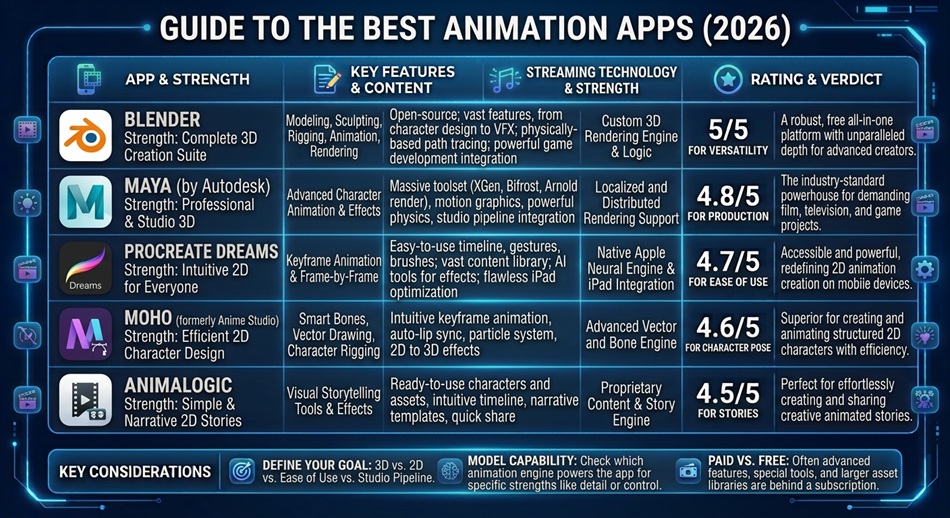
FlipaClip is the best animation app for most beginners, since it’s built specifically around frame-by-frame drawing with onion skinning to guide each new frame, simple enough to pick up in minutes but deep enough to keep using as you improve. If you want something more powerful for a genuinely serious 2D project without paying for a subscription, Synfig Studio is the stronger free, open-source option.
Animation software splits hard between “made for beginners” and “made for professional studios,” and picking the wrong end of that spectrum is the fastest way to quit before you finish anything. Here’s how to find the right level for where you actually are.
FlipaClip: best for learning frame-by-frame animation
FlipaClip strips animation down to its most fundamental form: draw a frame, see the previous one faintly behind it (onion skinning), draw the next frame, repeat. That’s genuinely how traditional animation works, and learning it this way builds an understanding that carries over to more advanced tools later. It’s approachable enough that kids use it, but the timeline and layer tools are real enough to support a serious short project too.
Synfig Studio: best free, open-source option for more advanced work
Synfig offers vector-based tweening, bone rigging, and layered control without a subscription or feature paywall, ever. It has a steeper learning curve than FlipaClip, but it’s genuinely capable of more sophisticated animation, closer to what a paid tool offers, just with more setup effort required to get there.
Moho Debut: best beginner-friendly paid option with real depth
Moho Debut strips back the complexity of professional animation software while still including tools like bone rigging, aiming specifically at people who want more capability than a pure beginner app but aren’t ready for a full professional suite’s learning curve.
Stop Motion Studio: best for physical, hands-on animation
If drawing isn’t your thing, Stop Motion Studio lets you animate physical objects, LEGO, clay, toys, by taking sequential photos that the app strings together into a movie. It’s a genuinely different creative process from drawn animation and a great entry point if you’d rather build than draw.
Adobe Creative Cloud (After Effects): best once you need a professional ecosystem
Once you outgrow beginner tools and need motion graphics integrated with a broader creative workflow (design, video, editing all connected), Adobe’s ecosystem, anchored by After Effects, is the industry-standard destination, at the cost of a real subscription and a real learning curve.
Pencil2D and Krita: best genuinely free options between FlipaClip and Synfig
Pencil2D is a minimal, fully open-source 2D animation tool that stays close to FlipaClip’s simplicity while running on desktop rather than mobile. Krita is primarily a painting app but includes a real animation timeline, a strong option if you’re already drawing digitally and want animation tools without switching software entirely.
Blender: best free option for 3D animation specifically
Everything else on this list is 2D. Blender is the standard free, open-source answer once you want to animate in 3D, complete with rigging, physics, and compositing tools that rival paid professional software. It’s a genuinely steep learning curve, closer to a second skill to learn than a beginner-friendly app.
Toon Boom Harmony: the professional standard for 2D specifically
If Adobe’s ecosystem is the general answer for professional motion graphics, Toon Boom Harmony is the more specific answer for professional 2D character animation, used widely in actual animated television and film production. It’s aimed squarely at working animators, with the subscription and learning curve to match.
AI animation tools: worth watching, not yet a full replacement
Text-to-video AI tools have moved from research demos to genuinely usable creative tools, letting you generate short clips from a text prompt. They’re a legitimate part of the landscape now, but they still work best as a supplement, generating raw material or quick concept clips, rather than replacing the control you get from actually animating something yourself.
Which one should you actually start with?
- Complete beginner, want to learn the fundamentals: FlipaClip.
- Want more power without paying: Synfig Studio.
- Ready for more depth but not a full professional suite: Moho Debut.
- Prefer building with physical objects over drawing: Stop Motion Studio.
- Working professionally or need a full creative ecosystem: Adobe Creative Cloud.
If photo editing is part of your workflow too, it’s worth pairing whichever animation app you pick with a solid free picture editing app for prepping source images and textures.
Frequently asked questions
What’s the easiest animation app for a total beginner?
FlipaClip is the most commonly recommended starting point, since its frame-by-frame drawing approach with onion skinning is simple enough for a child to use but still supports real animated projects.
Is there a genuinely free animation app that isn’t just a limited trial?
Synfig Studio is fully free and open-source with no subscription or feature paywall, which makes it different from apps that offer a “free” tier that’s really just a trial of the paid version.
Do I need to know how to draw to make an animation?
No. Stop Motion Studio lets you animate physical objects like toys or clay instead of drawing, which is a legitimate and popular animation style that doesn’t require drawing skill at all.
When is it worth switching to a professional tool like After Effects?
Once your projects need to integrate with broader video or design work, or you’re working toward professional-quality motion graphics specifically, After Effects and the Adobe ecosystem become worth the subscription and learning curve.