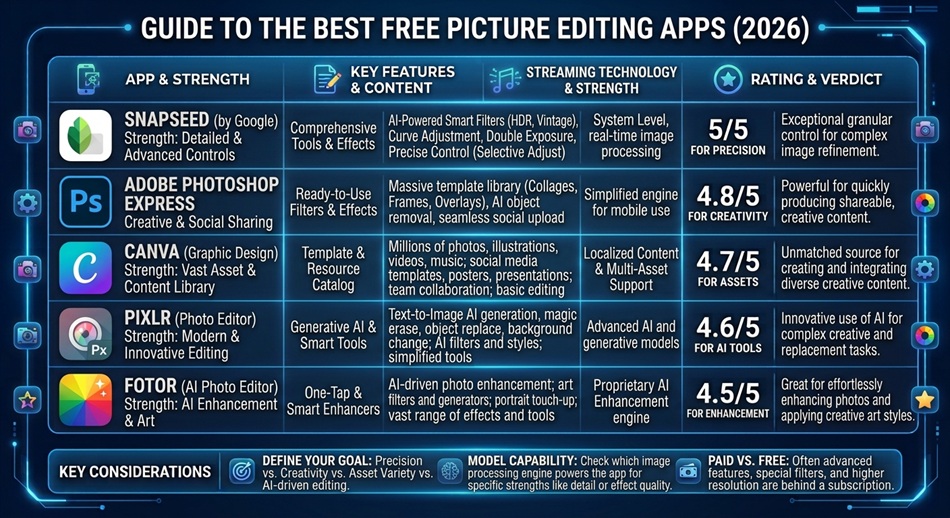
Snapseed is the best free picture editing app for most people, since it’s genuinely free with no ads and includes fully realized masking and selective-adjustment tools that most “free” competitors lock behind a paywall. If you need something browser-based instead of a phone app, Photopea gives you a Photoshop-style editor for free with no install at all.
There’s no single best free photo editor, because these apps solve genuinely different problems: some are quick mobile editors, some process RAW camera files, some manage a whole photo library, and others are really design tools that happen to edit photos. The right one depends on what you’re actually trying to do.
Snapseed: best free mobile editor
Snapseed remains the strongest fully free option on phones specifically because Google doesn’t gate its best tools, like selective masking and precise local adjustments, behind a subscription the way most competitors do. It handles everything from quick crops to serious selective retouching without ever asking for money.
Photopea: best browser-based editor
Photopea replicates Photoshop’s interface and core tools directly in your browser, including layers, masks, and support for opening actual PSD files. If you need Photoshop-level editing but don’t have Photoshop, or you’re on a computer where you can’t install anything, this is the closest free substitute available.
GIMP: best fully open-source desktop option
GIMP is a complete, actively developed desktop editor with no subscription, no ads, and no feature paywall, ever. It has a steeper learning curve than Snapseed and a less polished interface than paid competitors, but it’s the most capable genuinely free desktop editor that exists.
darktable or RawTherapee: best for camera RAW files
If you’re shooting RAW on a real camera, not just phone photos, darktable and RawTherapee are purpose-built for RAW processing in a way general editors aren’t, handling exposure, white balance, and lens corrections at the level RAW files actually need.
Photoshop Express: best for quick social-ready edits
Photoshop Express trades editing depth for speed: fast corrections, filters, collages, and templates aimed squarely at getting a photo ready for social media quickly, rather than serious retouching. It’s the right tool when Snapseed feels like more editor than you need.
Pixlr: best for a quick browser-based edit without the learning curve
Pixlr offers both a full editor and a faster, simplified “express” mode in your browser, aimed at people who want quick edits and effects without learning Photopea’s more complex Photoshop-style interface. It’s a genuinely useful middle ground between Photopea’s depth and Photoshop Express’s speed.
Affinity: best free professional suite (with a catch)
Affinity, now owned by Canva, made its professional photo, vector, and page-layout suite free, which is a genuinely big deal since it was previously a well-regarded paid alternative to Adobe’s apps. The catch is that it requires a Canva account and is tied to Canva’s broader ecosystem and terms, rather than being a standalone free download the way GIMP is.
Lightroom Mobile: best for organizing and editing a real photo library
Lightroom’s free tier covers core photographic adjustments (exposure, color, presets) and, importantly, library organization across your photos, not just one-off edits. It’s the right tool specifically when you’re managing hundreds or thousands of photos, not just touching up a handful.
Canva: best if editing is really part of a bigger design task
Canva isn’t a pixel editor in the traditional sense; it’s a design tool with solid free photo editing (crops, filters, backgrounds, text overlays) built in for when the actual goal is a finished graphic, social post, or flyer rather than a retouched photo on its own.
Google Photos: often enough, and already on your phone
Google Photos’ built-in editor covers basic adjustments, crops, and some AI-powered tools for free, and since most Android users already have it, it’s worth trying before installing anything else for simple edits that don’t need Snapseed’s depth.
Which one should you actually use?
- Editing phone photos, want real tools without ads: Snapseed.
- Need Photoshop-style editing without installing anything: Photopea.
- Want a full desktop editor, permanently free: GIMP.
- Processing RAW files from a real camera: darktable or RawTherapee.
- Just need a fast social-ready edit: Photoshop Express or Pixlr’s express mode.
- Want a professional suite without Adobe’s price tag: Affinity.
- Managing a large photo library, not just editing one shot: Lightroom Mobile.
- The edit is really for a finished design or social post: Canva.
A quick way to decide in under a minute
If you’re on a phone and just want to fix one photo, open Snapseed. If you’re at a computer with no software installed, use Photopea. If you’re organizing a whole library, use Lightroom Mobile. Everything else on this list is worth knowing about, but those three cover the large majority of what people are actually trying to do.
Frequently asked questions
Is Snapseed really free with no hidden paywall?
Yes. Unlike most competitors that gate advanced tools behind a subscription, Snapseed’s full toolset, including selective masking, is free with no ads and no in-app purchases.
Can I edit RAW photos on my phone for free?
Basic RAW support exists in some mobile editors, but for serious RAW processing, a dedicated desktop tool like darktable or RawTherapee will give you far more control than any phone app.
What’s the difference between Photopea and GIMP?
Photopea runs entirely in your browser with no install and mimics Photoshop’s interface closely, which makes it easier to pick up if you’ve used Photoshop before. GIMP is a separate desktop application with its own interface and a steeper learning curve, but more power once you’re comfortable with it.
Do I need a paid app for professional-quality photo editing?
Not necessarily. GIMP and darktable are used by working photographers and designers as genuine alternatives to paid software; the gap is more about workflow polish and learning curve than raw editing capability.