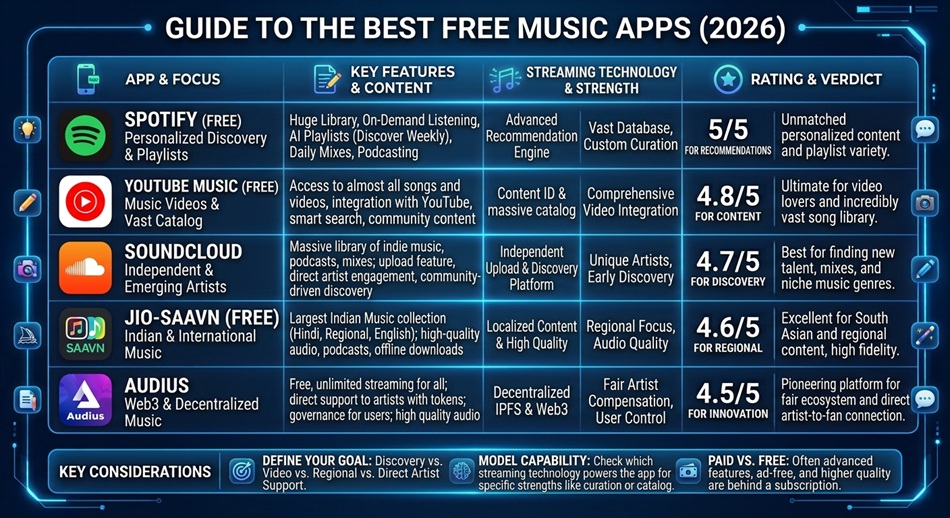
Spotify Free is the best free music app for most people, since it pairs a massive mainstream catalog with real personalization (playlists, Discover Weekly, podcasts) and works across nearly every device you own. If music videos, live performances, or remixes matter more to you than a clean streaming catalog, YouTube Music’s free tier is the better pick instead.
Worth setting expectations upfront: no free music app in 2026 gives you unlimited, ad-free, on-demand playback with offline downloads. That combination is what paid subscriptions are actually selling. What free tiers give you varies app to app, so the right choice depends on which trade-off you can live with.
Spotify Free: best all-around free option
Spotify’s free tier includes shuffle-mode playback, playlists, personalized discovery features, and podcasts, with ads breaking up listening periodically. Its catalog and cross-device support (phones, computers, smart speakers, cars) are the best of any free tier, which is why it’s the default recommendation for most people.
Limitation: free-tier Spotify on mobile is shuffle-only for most playlists and albums; you can’t pick an exact track to play on demand without a Premium subscription.
YouTube Music: best for videos, live performances, and rare versions
YouTube Music’s free tier pulls from YouTube’s enormous catalog, which includes music videos, live performances, remixes, and versions you won’t find on a traditional streaming catalog. If you care about that kind of content specifically, not just the studio track, this beats Spotify on selection even if the app itself is less polished.
SoundCloud: best for independent artists and DJ mixes
SoundCloud is where independent artists, DJ mixes, and early demos actually live, content you’re unlikely to find on Spotify or YouTube Music at all. If you’re into a specific underground or DJ-driven scene, SoundCloud’s free tier is the app built around exactly that.
Pandora: best for a simple, personalized radio experience
Pandora pioneered the “build a station around an artist” model and is still one of the easiest ways to get a personalized radio experience without building playlists yourself. It’s US-only, which is the main catch if you’re outside the country.
Musicolet or Pulsar: best for your own local music files
If you’re playing music files you already own rather than streaming, Musicolet and Pulsar are genuinely ad-free, capable local players, a different category from the streaming apps above but worth knowing about if that’s actually your use case. Both support playlists, equalizers, and folder-based browsing without ever asking for a subscription.
Amazon Music and Tidal: worth knowing about, even without a free tier
Neither offers a meaningful free streaming tier the way Spotify and YouTube Music do, but they’re worth mentioning because they solve a different problem: audio quality. If you eventually decide sound quality matters more than saving money, both offer lossless or high-fidelity streaming as their core paid feature, which none of the free apps above can match at any price point.
Audiomack: best for hip-hop and emerging artists specifically
Audiomack has built a genuine following specifically in hip-hop and emerging-artist circles, with a free tier that includes offline downloads, something none of the majors above offer for free. If SoundCloud’s broader indie scene isn’t quite your genre, Audiomack’s more focused community might be a better fit.
iHeartRadio: best for live radio stations and podcasts together
iHeartRadio combines actual live radio stations from around the US with on-demand podcasts in one free app, which is a different experience from algorithmic playlists if you specifically like the format of a real radio station, including talk and news programming, not just music.
Bandcamp: best for directly supporting independent artists
Bandcamp lets you stream free but is really built around direct artist support: a meaningfully larger share of what you pay goes to the artist than on major streaming platforms. It’s less useful as a daily driver for mainstream listening and more useful as where you go to discover and actually pay independent musicians.
Which one should you actually use?
- Want the best all-around free experience: Spotify Free.
- Care about videos, live performances, or rare versions: YouTube Music.
- Into independent artists or DJ culture: SoundCloud.
- Want simple radio-style listening: Pandora (US only) or iHeartRadio for live stations.
- Playing your own downloaded files: Musicolet or Pulsar.
- Specifically into hip-hop or emerging artists: Audiomack.
- Want to directly support independent musicians: Bandcamp.
Frequently asked questions
Is there a truly ad-free free music app?
Not among the major streaming catalogs. Spotify, YouTube Music, and Pandora’s free tiers all include ads; that’s how they fund free access to a licensed catalog. Local file players like Musicolet are ad-free, but they’re not streaming services.
Can I download songs for offline listening on a free plan?
No, offline downloads are a paid-tier feature on Spotify, YouTube Music, and most major streaming apps. Free tiers require an internet connection to play.
Why can’t I pick an exact song to play on Spotify’s free tier?
Spotify’s licensing agreements restrict on-demand track selection to paid subscribers on mobile; free mobile users get shuffle play instead, though on-demand playback is available for free on desktop.
Which free music app has the best sound quality?
Among the free tiers, differences in audio quality are relatively minor since none offer lossless streaming for free. If audio quality is a priority, that’s specifically a paid-tier feature worth comparing separately (Tidal and Amazon Music are generally considered strongest on this front).