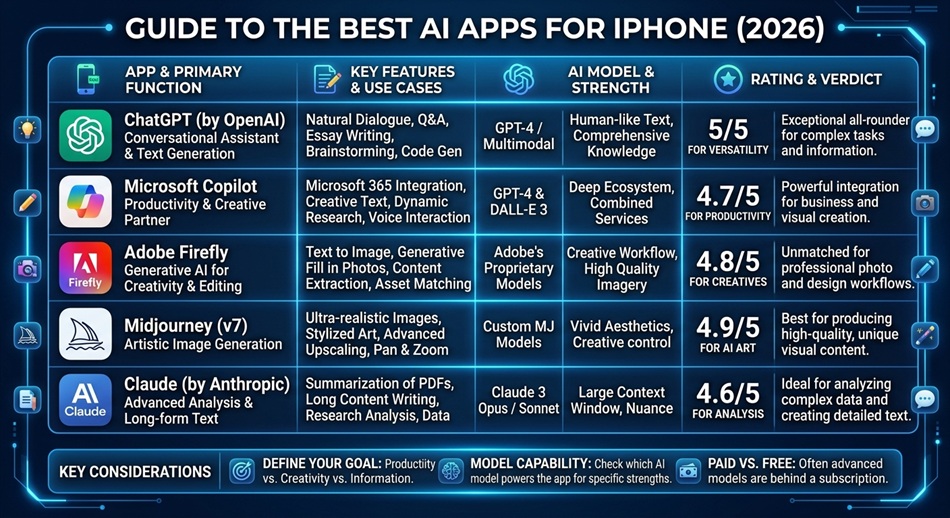
ChatGPT is the best all-around AI app for iPhone, holding the top Productivity spot in the App Store for good reason: it’s free to start, its Advanced Voice Mode is genuinely usable hands-free in the car, and it integrates directly into iOS through Home Screen widgets, Lock Screen widgets, and Shortcuts. But “best” depends heavily on what you’re actually using it for, and a few specialists beat ChatGPT at their one job.
The AI app category on iPhone got crowded fast, and most roundups just list ten apps that all do roughly the same thing. The more useful question is which app to open for which task, since most people end up with two or three AI apps, not one.
ChatGPT: best general-purpose AI assistant
ChatGPT’s free tier covers most everyday use, and its iOS integration is deeper than any competitor’s: ask it something from a Lock Screen widget, trigger it through Shortcuts, or use Advanced Voice Mode for a hands-free conversation that actually sounds natural. If you only install one AI app, this is still the right default. It’s also gotten more useful on Apple’s own turf specifically, now that ChatGPT can read and reply inside Apple Messages on Mac too.
Limitation: the free tier has usage limits on the most capable model, and heavy daily users will hit rate limits that push them toward a subscription.
Claude: best for long-form writing and analysis
Claude’s strength is handling long documents and nuanced writing tasks with more consistency and less “AI voice” than most competitors. If you’re drafting, editing, or working through something that needs to hold together across several paragraphs, Claude is the app worth switching to for that specific job. It’s also noticeably better at holding context across a long conversation without losing track of earlier details.
Limitation: Claude’s iOS integration (widgets, Shortcuts) is thinner than ChatGPT’s, so it’s less convenient for quick, on-the-go questions.
Gemini: best for Google-integrated workflows
If your life runs through Gmail, Google Docs, and Google Calendar, Gemini’s native integration with those tools makes it the more convenient choice for anything that touches your existing Google workflow, even if its general conversational ability trades blows with ChatGPT. It can pull context directly from your inbox or calendar in a way apps outside Google’s ecosystem simply can’t.
Perplexity: best for research with actual sources
Perplexity answers questions with cited sources instead of just a confident paragraph, which matters a lot when you’re actually trying to verify something rather than just get a quick answer. It functions more like a search engine with an AI layer on top than a general chatbot, which makes it the better choice specifically when accuracy and traceability matter more than conversational polish.
NotebookLM: best for turning your own documents into something usable
NotebookLM is built specifically to ingest documents you upload (notes, PDFs, research) and turn them into summaries, study guides, or even a podcast-style audio overview. It’s a specialist tool: less useful as a general assistant, much more useful when you have a specific pile of source material to work through, like exam notes or a research folder you need to actually digest.
CapCut: best for AI-assisted video editing
CapCut brings AI tools like automatic captioning, background removal, and smart video cuts into a genuinely capable free video editor, which puts it in a different category from the assistants above but earns it a spot if video is part of what you’re actually making on your phone.
Grammarly: best for catching writing mistakes as you type
Grammarly works differently from the assistants above: instead of a chat window you go to, it runs in the background across other apps (Mail, Notes, Messages) catching grammar, tone, and clarity issues as you write, rather than requiring you to paste text somewhere to check it.
Otter.ai: best for recording and summarizing meetings or lectures
Otter records audio and produces a searchable transcript with an AI-generated summary, built specifically for meetings, interviews, and lectures rather than general conversation. If you regularly need a written record of something spoken, this solves that specific problem better than a general assistant would.
Replit: best for AI-assisted coding on a phone
Replit brings an AI coding assistant into a real, working development environment, letting you write, run, and even deploy code from an iPhone. It’s a niche pick, but there’s genuinely nothing else on this list built for that specific job.
Which one should you actually install?
- Just want one AI app that does everything reasonably well: ChatGPT.
- Writing or editing long-form content: Claude.
- Live inside Google’s ecosystem: Gemini.
- Need answers with real sources: Perplexity.
- Working through your own notes or documents: NotebookLM.
- Editing video on your phone: CapCut.
- Want mistakes caught as you type, everywhere: Grammarly.
- Need a transcript and summary of something spoken: Otter.ai.
- Coding on your phone: Replit.
Frequently asked questions
Do I need to pay for an AI app on iPhone?
No. ChatGPT, Claude, Gemini, and Perplexity all offer usable free tiers. Paid plans unlock higher usage limits, faster response times, and more advanced models, but the free versions cover most everyday tasks.
Which AI app has the best voice mode for hands-free use?
ChatGPT’s Advanced Voice Mode is currently the most natural-sounding and widely available hands-free option on iPhone, and it works well for use cases like driving or cooking where typing isn’t practical.
Is it worth using more than one AI app?
For most people, yes. A general assistant like ChatGPT covers day-to-day questions, while a specialist like Perplexity for research or NotebookLM for document work handles the tasks the general app is weaker at.
Which AI app integrates best with iOS specifically?
ChatGPT currently has the deepest iOS integration, including Home and Lock Screen widgets and Shortcuts support, which makes it the most convenient to trigger quickly without fully opening the app.