HeardThat is the best free hearing enhancer app for most people, since it uses AI-powered speech separation to isolate voices from background noise in real time, which is the specific problem most people reaching for a hearing enhancer app actually have: struggling to follow conversation in a noisy restaurant or gathering, not general amplification. If you’re on Android and want a simpler, fully free option with no subscription, Google’s built-in Sound Amplifier is the better starting point.
Worth saying clearly upfront: these apps are not hearing aids, and they’re not a substitute for one if you have diagnosed hearing loss. What they’re genuinely good at is a narrower job: boosting and clarifying sound in specific situations, like a loud room or a video call, using the microphone and speaker you already have. It’s also worth knowing that “hearing enhancer” covers more ground than just amplification: live transcription and captioning apps solve a related but different problem, turning speech into text you can read instead of trying to hear it more clearly, and they’re worth considering alongside the amplifier apps below depending on your actual situation.
HeardThat: best for noisy environments specifically
HeardThat’s AI-powered speech enhancement is built to separate speech from background noise, which is a meaningfully harder problem than simple volume amplification and the reason generic “louder” apps often fail in a crowded restaurant. It works on both iPhone and Android, with a free trial before the subscription kicks in.
Sound Amplifier (Android): best free, no-subscription option
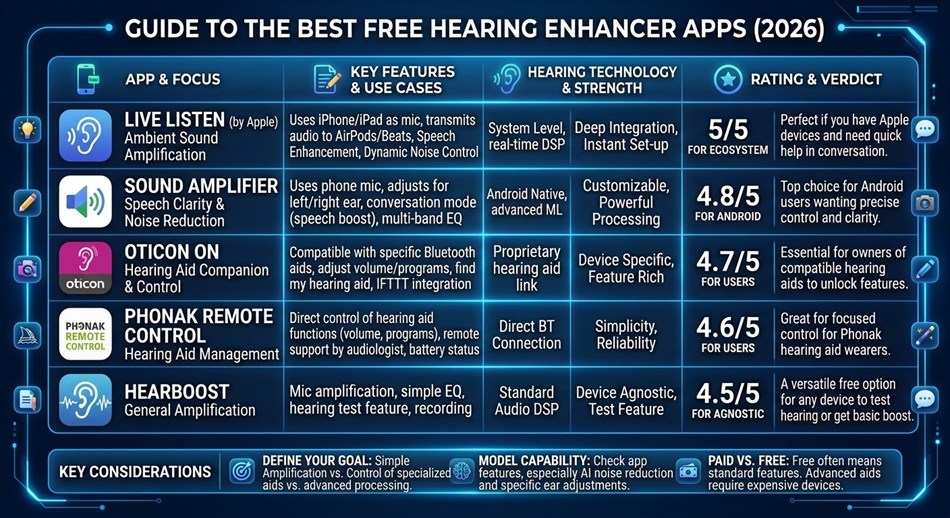
Google’s Sound Amplifier is a genuinely free Android tool that boosts and filters sound through wired headphones, with built-in noise reduction. It’s not as sophisticated as HeardThat’s AI separation, but it costs nothing and requires no account or subscription, which makes it a reasonable first thing to try before paying for anything.
Live Listen (iPhone): best if you already use AirPods
Apple’s Live Listen feature, built into iOS, turns your iPhone into a remote microphone that streams audio directly to your AirPods, which is genuinely useful for hearing someone across a quiet-to-moderate room. It’s free, already on your phone, and doesn’t need a separate app download at all.
Chatable: best for structured conversation support
Chatable focuses specifically on noise reduction for conversations, available on both iPhone and Android, though the full feature set sits behind a monthly subscription. It’s a reasonable alternative to HeardThat if that app’s specific approach doesn’t work well for your situation.
Petralex: worth trying if you want a personalized hearing profile
Petralex includes a basic hearing test you can take within the app to build a personalized sound profile, then applies real-time amplification and filtering tuned to that profile. It’s a middle ground between a generic amplifier and an actual clinical hearing aid, though the in-app test is a convenience tool, not a substitute for a real audiologist’s exam.
Live Transcribe: best for turning speech into text in real time
Google’s Live Transcribe converts spoken conversation into live, on-screen text, which sidesteps the amplification problem entirely by giving you something to read instead of strain to hear. It’s free, works well for one-on-one conversation, and is a genuinely different tool from an amplifier rather than a competitor to one.
Ava: best for group conversations and meetings
Ava specializes specifically in transcribing group conversations, labeling who’s speaking, which single-speaker transcription apps handle poorly. It’s the stronger pick for meetings, classes, or gatherings where more than two people are talking.
Otter.ai: worth knowing as a dual-purpose option
Otter is built primarily as a meeting transcription tool, but it does double duty as a hearing-support app for the same reason Live Transcribe and Ava do: real-time text is often more reliable than amplified audio in a genuinely difficult listening environment.
Mimi: best for understanding your own hearing first
Mimi offers an in-app hearing test that gives you a clearer picture of your actual hearing profile, which is useful context before deciding whether an amplifier app, a transcription app, or an actual audiologist visit is the right next step.
What actually matters when choosing one
- What problem are you actually solving? General amplification, isolating speech in noise, and phone-call clarity are three different problems, and the app built for one isn’t necessarily good at the others.
- Wired vs. wireless: some apps, like Sound Amplifier, work best with wired headphones specifically, since Bluetooth audio delay can make real-time amplification feel out of sync with what you’re seeing.
- Subscription vs. one-time cost: most of the more sophisticated AI-powered options are subscription-based; if cost matters more than sophistication, the free built-in options are worth trying first.
Which one should you actually use?
- Struggling specifically in loud, crowded environments: HeardThat.
- Android, want something free with no subscription: Sound Amplifier.
- iPhone, already have AirPods: Live Listen, built in, no download needed.
- Want a personalized profile based on your own hearing: Petralex.
- Prefer reading over hearing, especially one-on-one: Live Transcribe.
- Need transcription for group conversations or meetings: Ava.
- Want to understand your own hearing profile first: Mimi.
Frequently asked questions
Can a hearing enhancer app replace a hearing aid?
No. These apps can help in specific situations like noisy rooms or phone calls, but they’re not medical devices and aren’t a substitute for a proper hearing aid if you have diagnosed hearing loss. If you suspect real hearing loss, see an audiologist.
Is Apple’s Live Listen actually good enough to rely on?
For moderate situations, like hearing someone across a quiet-to-moderately noisy room, yes, and it costs nothing since it’s already built into iOS. For genuinely loud environments, a dedicated app like HeardThat with AI noise separation will outperform it.
Do free hearing enhancer apps actually work?
Basic ones like Sound Amplifier genuinely help with straightforward volume boosting and light noise reduction. For harder problems, like isolating one voice in a crowded room, the more advanced AI-powered apps like HeardThat do a noticeably better job, which is part of why they charge for it.
Which app is best for phone calls specifically?
Chatable and HeardThat are both built with conversation clarity as the core use case, which makes them better suited to calls and in-person conversation than a general volume-boosting app.