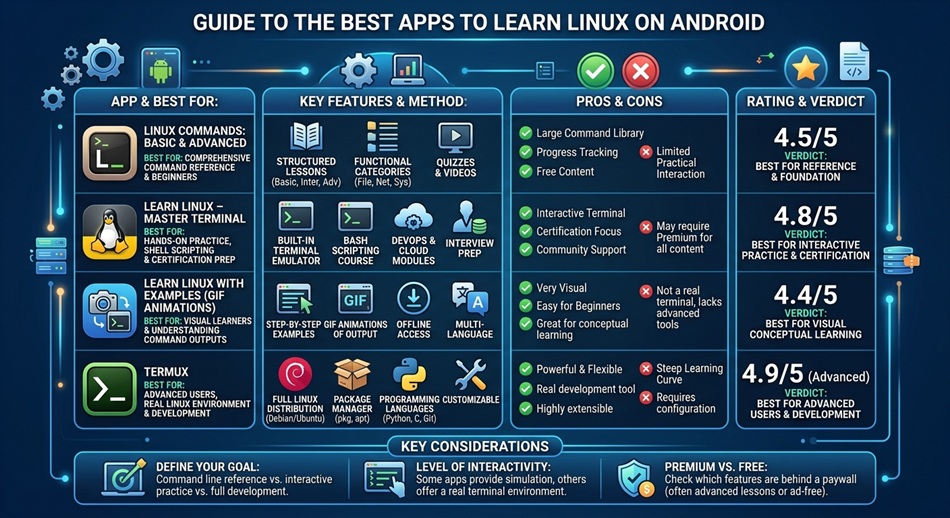
Termux is the best app to learn Linux on Android, since it gives you a real Linux userland (not a simulation) directly on your phone, no root required, with access to Python, Node, git, SSH, and thousands of packages through a simple package manager. If you specifically want a full graphical distro like Ubuntu or Kali instead of a terminal, UserLAnd is the better starting point.
Learning Linux on a phone sounds like a compromise, and in some ways it is, but it’s also a genuinely good way to build real command-line habits in spare moments instead of waiting until you’re at a computer. The trick is picking the right tool for what you’re actually trying to learn.
Termux: best for actually learning the command line
Termux gives you a real terminal with a real Linux environment, not an emulator pretending to be one. Once it’s installed and sitting in your app drawer alongside everything else, run pkg install python and you have a working Python interpreter; install git, openssh, or nodejs the same way. It’s the closest thing to sitting at a real Linux terminal that you’ll get on a phone, which makes it the right choice if your actual goal is learning commands, scripting, and how a Linux system works.
Limitation: Termux doesn’t give you a graphical desktop by default, and Android’s on-screen keyboard is missing keys like Esc, Ctrl, and Tab that you’ll use constantly in a terminal.
Hacker’s Keyboard: the companion app you actually need
Standard Android keyboards make command-line work genuinely painful because they lack the keys terminal work depends on. Hacker’s Keyboard adds a full five-row PC-style layout with Ctrl, Alt, Esc, Tab, and arrow keys, and it’s close to a requirement if you’re using Termux seriously rather than just poking at it occasionally.
UserLAnd: best for a full graphical Linux distro
UserLAnd lets you install complete distributions like Ubuntu, Debian, Kali Linux, or Alpine, and optionally run them with a full desktop environment over VNC instead of just a terminal. If your goal is learning what a real Linux desktop looks and feels like, not just command-line basics, UserLAnd gets you there in a way Termux alone doesn’t.
Limitation: a full graphical distro is noticeably heavier on your phone’s storage and battery than Termux’s lightweight terminal environment, and VNC-based desktops feel sluggish on older hardware.
Andronix: the easiest on-ramp if Termux alone feels intimidating
Andronix acts as a guided installer that sets up a full Linux distro with a desktop environment on top of Termux, handling most of the manual setup steps for you. It’s a reasonable middle ground if UserLAnd’s options feel like too much and raw Termux feels like too little.
SSH clients: for connecting to remote Linux servers, not your phone itself
Once you’re learning Linux beyond your own device, connecting to a remote server or VPS is a normal next step, and a dedicated SSH client is a genuinely different tool from Termux (which gives you a local environment) or UserLAnd (which gives you a local distro). JuiceSSH and Termius are the two most commonly recommended options, both offering a proper mobile-friendly terminal experience, saved connections, and key-based authentication, while ConnectBot is a lighter, fully open-source alternative if you’d rather avoid an account-based service.
What you can actually learn this way
It’s worth being realistic about scope: a phone-based Linux setup is genuinely good for learning the command line, package management, basic scripting, and navigating a real filesystem. It’s a weaker fit for anything that needs serious CPU or GPU power, or for software that expects a full desktop environment with native performance. Treat it as where you build fundamentals, not where you’ll do heavy compiling or resource-intensive development work long-term.
Which one should you actually start with?
- Want to learn real command-line skills: Termux, plus Hacker’s Keyboard.
- Want a full desktop-style Linux distro: UserLAnd, or Andronix if you want the setup handled for you.
- Not sure yet: start with Termux. It’s lighter, and everything you learn there carries over if you move to a full distro later.
Frequently asked questions
Do I need to root my Android phone to run Linux on it?
No. Termux, UserLAnd, and Andronix all work without root access. Rooting was a common requirement for older Linux-on-Android methods, but modern apps like these don’t need it.
Can I actually code and run real programs in Termux?
Yes. Termux supports Python, Node.js, and most common development packages through its package manager, and you can write and run real scripts, connect to remote servers over SSH, and use git for version control, all from your phone.
What’s the difference between Termux and UserLAnd?
Termux gives you a Linux command-line environment directly, while UserLAnd installs complete, separate Linux distributions (like Ubuntu or Kali) that can include a full graphical desktop. Termux is lighter and more direct; UserLAnd is closer to running an actual Linux computer.
Is it worth learning Linux on a phone instead of just using a computer?
It’s not a full replacement for a computer, but it’s a legitimate way to build real command-line habits during spare time, and every skill you build in Termux (package management, basic scripting, navigating a filesystem) transfers directly to a real Linux machine.